One mailbox is solved. A household isn't.
Giving one person's assistant one mailbox on one laptop is well covered. A dozen small servers do it.
The trouble starts when the assistant is shared. Open WebUI and LibreChat are built for several people, and so is any family or small team that runs its own. A mail tool wired to one mailbox is either useless to everyone else, or it shows one person's mail to all of them.
Postovna holds several people's mailboxes in one place, whatever the provider. Each person adds their own on a page, and only they can ask about them.
What an assistant will be able to do
Each mailbox has a level. You choose how far up it goes.
- Read
Find and read your own mail, across all your mailboxes at once. Folders are opened read-only.
list_mailboxes, list_folders, search_mail, read_message - Organise
Move, mark, archive and move to Trash, which is never emptied. Each batch waits for your yes on a page the assistant can't open.
move_message, mark, archive, trash - Draft
Write a message or a reply into your own Drafts folder. You read it and you send it.
save_draft - Send
Off. Sending is a separate part that isn't loaded unless whoever runs the server switches it on. Where it is off, the code isn't running.
How it fits together
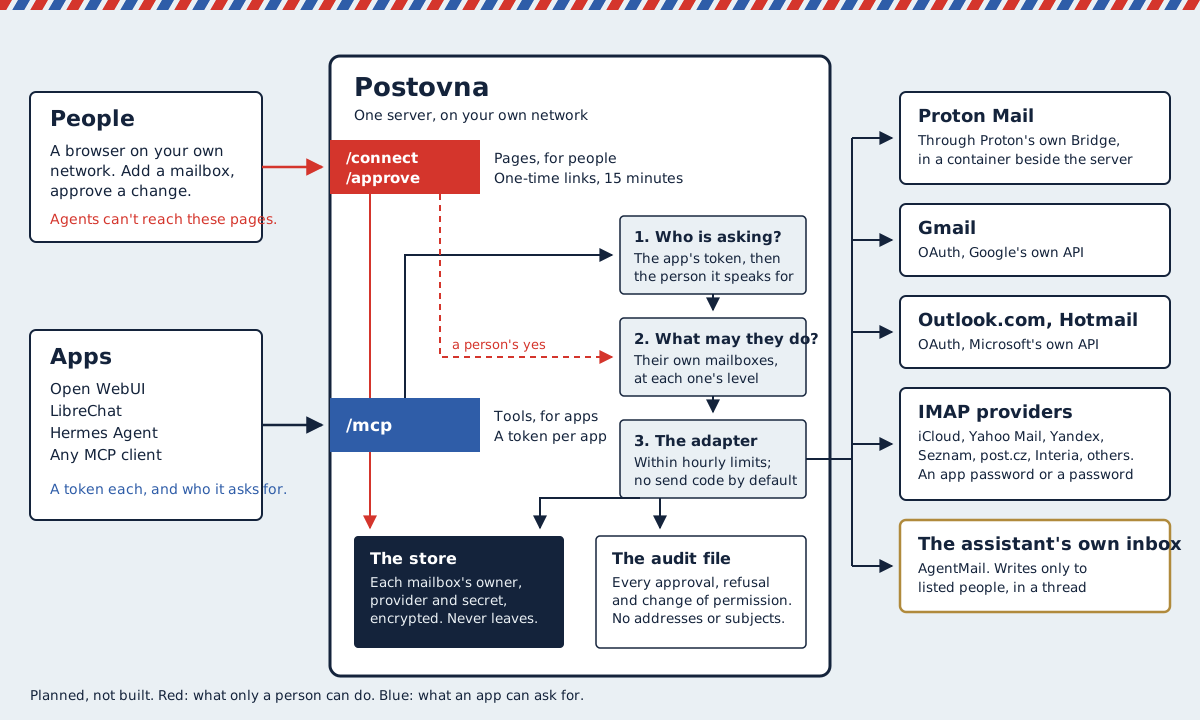
Two doors
Apps get the tools over MCP. People get pages for adding a mailbox and approving a change. An assistant can't open the pages, so it can't approve its own request, whatever an email told it to do.
You connect by signing in
Say "connect my mail" and you get a link that works once, for 15 minutes. You sign in on the page. No password is ever typed into a chat, where it would stay in the history.
The secrets stay inside
Sign-in tokens and app passwords are encrypted in the server's store. They never appear in a tool's answer, a log or a conversation.
Which mailboxes
Four ways of signing in sit behind one page. You just pick your provider.
| Proton Mail | Through Proton's own Bridge, which runs beside the server. Needs a paid Proton plan. |
|---|---|
| Gmail, Outlook.com, Hotmail | You sign in at Google or Microsoft and approve. The server keeps a token, never a password. |
| iCloud, Yahoo Mail, Yandex, Seznam, post.cz | An app password you make at the provider. The page links to where. |
| Interia and any other IMAP provider | Your address and password. The page looks up the server settings. |
| An inbox of the assistant's own | An address you can forward to, at AgentMail. It can write only to people you list. |
What it refuses to do
- Show one person's mail to anotherEvery tool has a test that tries exactly that.
- Send as you, unless switched onAnd it never deletes for good or forwards.
- Take a password in a chatSigning in happens on a page, in your browser.
- Treat an email as instructionsAnyone can send you one. Every answer is marked as text from outside.
- Keep a copy of your mailNo index and no archive. It reads from your provider when asked.
- Run as someone else's serviceIt is self-hosted, for your own people.
The road
Each step ends with a test, and the next doesn't start until it passes.
- The design is writtenThree existing projects were read in source first. Nothing is built.
- The groundworkA threat model, checks on every change, and a reviewed main branch, before any code that touches a password.
- IMAP, read only, one personThe read tools, the encrypted store, one mailbox added by hand.
- The connect pageAdding a mailbox from a phone: iCloud, Yahoo Mail, Yandex, Seznam, post.cz, Interia and others.
- ProtonThrough Proton's own Bridge, once Proton has answered the question sent to it in writing.
- Gmail and Outlook.comSigning in at the provider. Revoking there cuts the server off.
- OrganiseWith the approval page: a planted email that asks to be forwarded changes nothing.
- DraftsA reply lands in your Drafts, in the right thread, and nothing is sent.
- An inbox of the assistant's ownForged senders dropped, and replies only to listed people.
Know this before you rely on it
Whoever runs the server can reach every connected mailbox
A family accepts that. A team has to be told, and the connect page will say so.
Proton's terms restrict automated access
They allow it only where it can't be told apart from a person's ordinary mail client, and they leave the judgment to Proton. Postovna is designed to behave like a mail client: one steady connection, limits on changes, and it never works around a Proton check. Connecting a Proton account will still be your own decision.
It is unofficial
It isn't affiliated with Proton, Google, Microsoft, Apple, AgentMail or any other provider.